
Zombie Love Story AI Video
The zombie trend that ends in a hug. Upload two photos and get a 15-second film: a standoff, a lowered weapon, an embrace and a happy memory.
- 80 credits
- Ready in 4–6 minutes
- 9:16 vertical
Examples
How it works
- 01
Upload two photos
First one of you, the survivor, then one of the person or pet who turns. One face per photo, looking at the camera.
- 02
Pick who turned
Partner, parent, best friend or pet, then press Generate. The film takes about four to six minutes, and it keeps rendering if you leave the page.
- 03
Download and post
Get a 15-second vertical MP4 with its own score. Post it as it is, or add the trending sound in TikTok, Reels or Shorts.
Who turned?
Partner
Ends on a sunny picnic, sharing a kiss.
Parent
Ends on a warm family dinner and a hug.
Best friend
Ends on a summer road trip, singing in the car.
Pet
Ends with your pet leaping into your arms.
What is the AI zombie love story trend?
By the BlinkPop team · Updated
The AI zombie trend took off on TikTok and Reels in October 2026. Each clip is a tiny film in two halves: in a dark, frozen hideout, a survivor aims a weapon at someone they love who has turned into a zombie, hesitates, lowers it and hugs them instead.
At the moment of the hug the film cuts to a warm memory from before the apocalypse: a picnic, a family dinner, a road trip, a dog leaping into their arms. That switch from dread to tenderness is why people share it with the person in the video.
Our generator builds the whole film from your two photos. It is an independent tool, not affiliated with any show, film or creator.
How to make a zombie love story AI video
Upload a photo of yourself and one of the person or pet who turns, pick who turned, and press Generate. The story, the weapon and the memory change with your choice, and the pet version keeps your animal recognizable even as a zombie. The finished video is saved in My videos.
The 15 seconds, shot by shot
Every video follows the same four beats, from a frozen hideout to a warm memory.
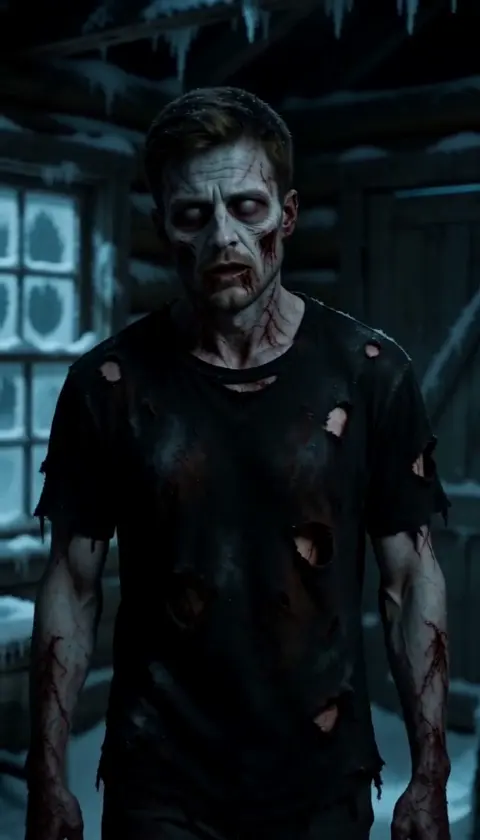 00:00Standoff
A snowed-in cabin at night. The one who turned stands in the lantern light; you aim, hands shaking.
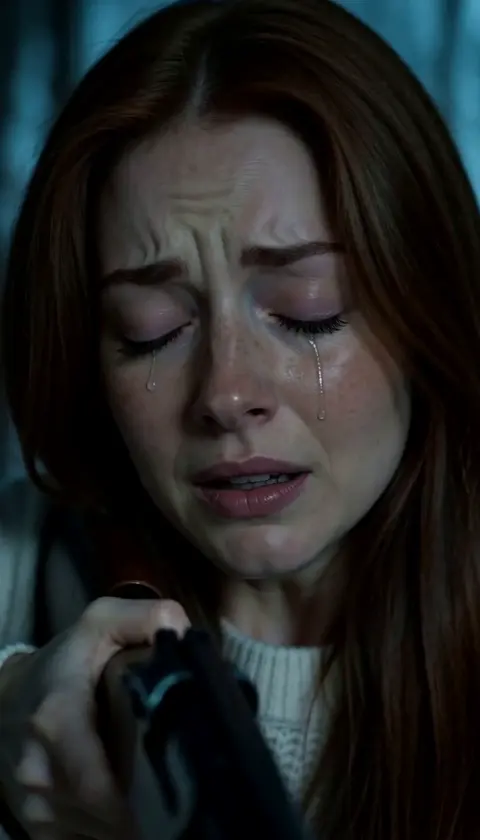 00:04Hesitation
Close-up: you hesitate, lower the weapon and open your arms.
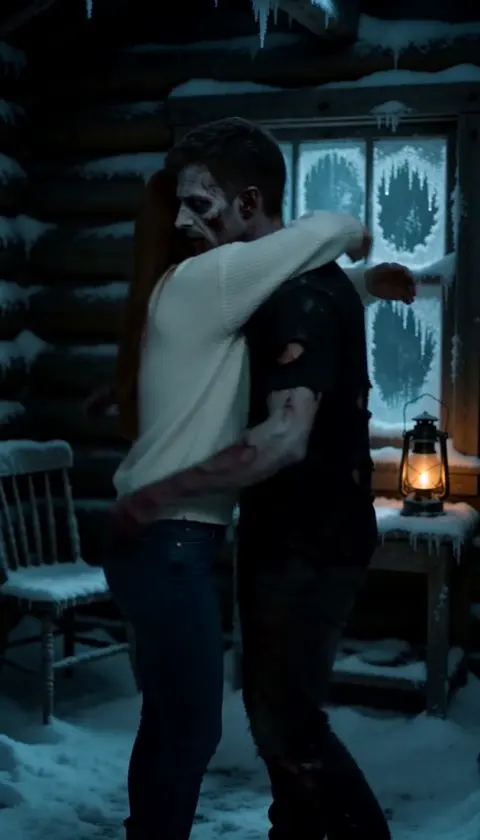 00:07Embrace
You hold them tight, and the film cuts on the moment of contact.
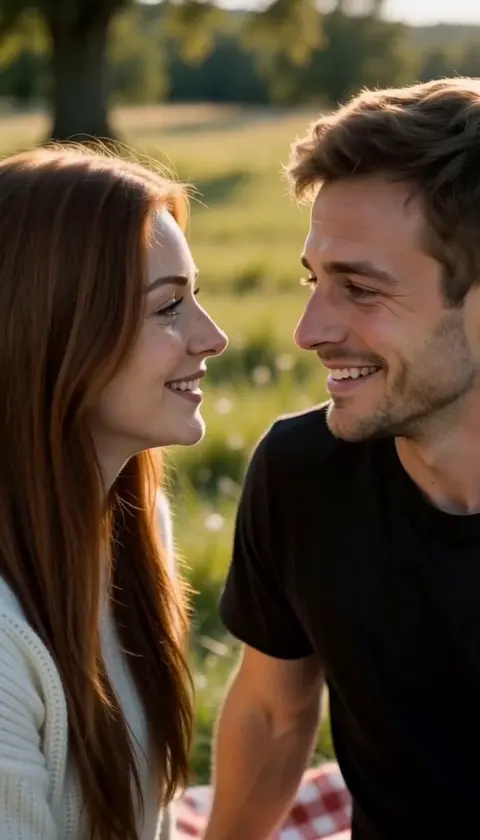 00:10Memory
A golden-hour memory from before, both of you healthy and happy.
Tips for a better zombie love story
- 01
One clear face per photo
One person per photo, facing the camera, in even light. Two separate photos work better than one photo of you together.
- 02
Make the two of you look different
Different hair or outfits keep the two faces from blending into one.
- 03
Skip sunglasses and filters
Sunglasses, masks and beauty filters hide the face; the zombie make-up goes on top of the real one.
- 04
Use a sharp pet photo
For a pet, pick a photo where the animal faces the camera and its markings are clear.
- 05
Roles the wrong way round?
Tap Swap sides before you generate. The first photo is always the survivor.
Sound and posting
Every video comes with an original instrumental score: a tense drone during the standoff, then soft piano from the hug onwards. There are no voices or lyrics, so it is ready to post as it is. If you would rather use the trending sound, lower the original audio when you add the sound in TikTok, Reels or Shorts.
What you get
- A 15-second MP4 video, vertical 9:16, at 768p, with an instrumental soundtrack.
- Four versions of the story to pick from (partner, parent, best friend or pet), all at the same price.
- The finished video saved in My videos, so you can download it again later.
- A price of 80 credits, shown on the button before you start, and an automatic refund if generation fails.
Do you have to label AI videos on TikTok, YouTube and Instagram?
Yes, for realistic ones. A BlinkPop video puts a real face into a scene that never happened, which is exactly what the platforms ask you to disclose. Here is what each one says in its own words:
“We require creators to disclose AI-generated or altered content that seems realistic.”
“The policy requires people to label AI-generated content that contains realistic images, audio or video, in order to help viewers contextualize the video and prevent the potential spread of misleading content.”
“We will still display the "AI info" label for content we detect was generated by an AI tool.”
In practice: switch on the platform's AI-generated label (or add "made with AI" to the caption) whenever you post a BlinkPop video, and only use photos of people who agreed to it.
FAQ
What is the AI zombie trend?
A short film made from two photos: a survivor finds someone they love turned into a zombie, lowers the weapon, hugs them, and the clip cuts to a happy memory from before.
Do I need two photos?
Yes: one of you (the survivor) and one of the person or pet who turns. Two separate photos give the most consistent faces.
Can I make it with my pet?
Yes. Pick Pet and upload a clear photo of your dog, cat or other animal as the second photo.
Does the video have sound?
Yes, an original instrumental score with no voices or lyrics. You can keep it, or lower it and add the trending sound when you post.
Is there blood or gore?
No. The weapon is never fired: the story turns on the moment the survivor lowers it and hugs the one who turned.
Can I use a photo of someone else?
Only an adult who agreed to it. Photos of celebrities, public figures or children are not allowed.
How much does a zombie love story video cost?
80 credits per video, since the six-shot film uses a heavier video model than our party effects. Failed videos are refunded automatically.